Provet Release – May 2026: Bulk invoicing, smarter reminders, and a fresh look
Send a month's worth of client invoices in one click
For: Practice Managers · Finance / Admin
Picture the last Friday of the month at a charity clinic billing 80 invoices for the period. Until now, your reception team would finalize and send them one by one — an afternoon of clicks, copy-paste, and PDF attachments.
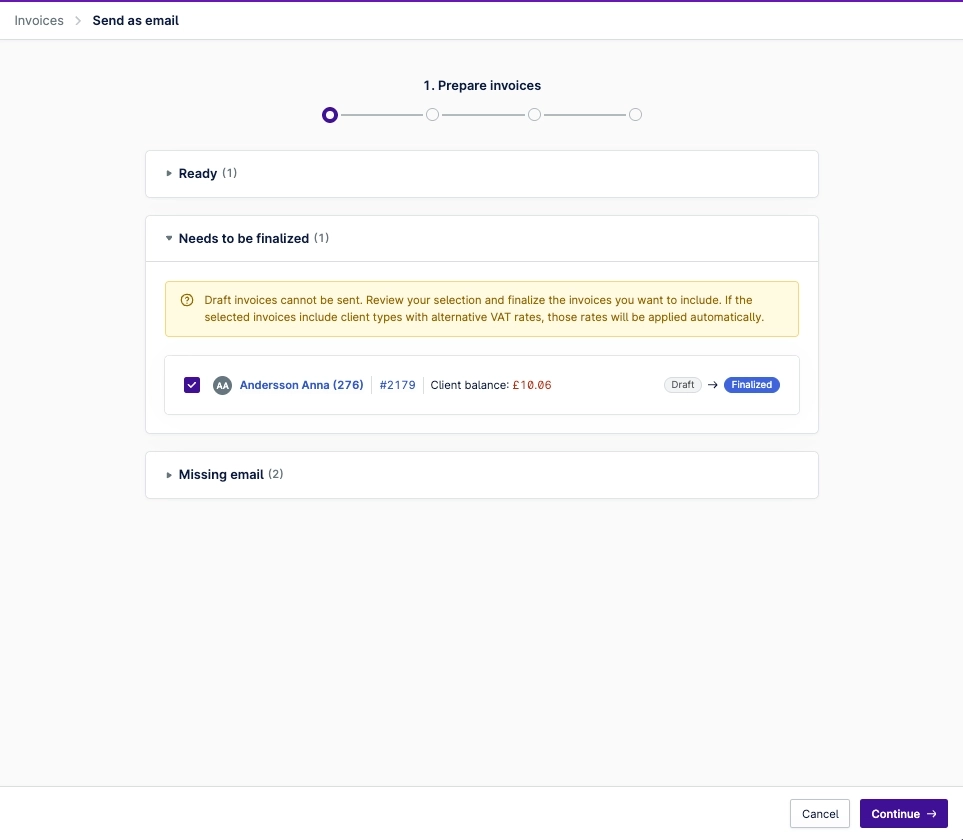
Bulk invoice sending changes that. Select the invoices and Provet groups them by client, generates a single PDF per client (with a clean summary plus all invoices), and sends the emails for you. Up to 500 invoices per run.
Try it: Invoice dashboard → select invoices → Send as email. Single client? Client page → Billing → Invoice table.
.png)
Charge the right price for every patient — automatically
For: Veterinarians · Practice Managers · Mixed-species clinics
A medicine dispensed to a cat shouldn't always carry the same markup as the same item used on a large dog. An injection fee that fits a small-animal appointment may not fit a farm visit at all.
Conditional pricing lets you set rules — by species, item type, usage, VAT or location — that apply the right price the moment an item is added to a consultation. New this release: rules can now control injection and handling fees too (exclude them, or swap in a different procedure item).
Heads up: estimates don't yet fully support conditional pricing. If estimates are central to your workflow, we'd suggest waiting until that's live.
Try it: Settings → Lists & Templates → Conditional Pricing.
.png)
Help: Set Up Conditional Pricing
Reminders that stop chasing clients who've already booked
For: Veterinarians · Practice Managers · Customer Comms
You've seen it happen: a client books their pet's annual check, then keeps getting reminder texts about… that same check. Multi-step reminder sequences had no way to know when a client had already taken action — until now.
Reminders can now pause when an upcoming appointment is scheduled (and resume if it's cancelled), or cancel once the underlying care has been delivered — like a vaccination given or a yearly health check completed.
Try it: Settings → Reminders → edit any rule.
.png)
Help: Manage Automatic Patient Reminders
Improvements
Better end-of-month reconciliation for Provet Pay
For: Finance / Admin · Provet Pay users
Reconciling card payments and understanding processing fees has been one of the most common reporting pain points for Provet Pay users.
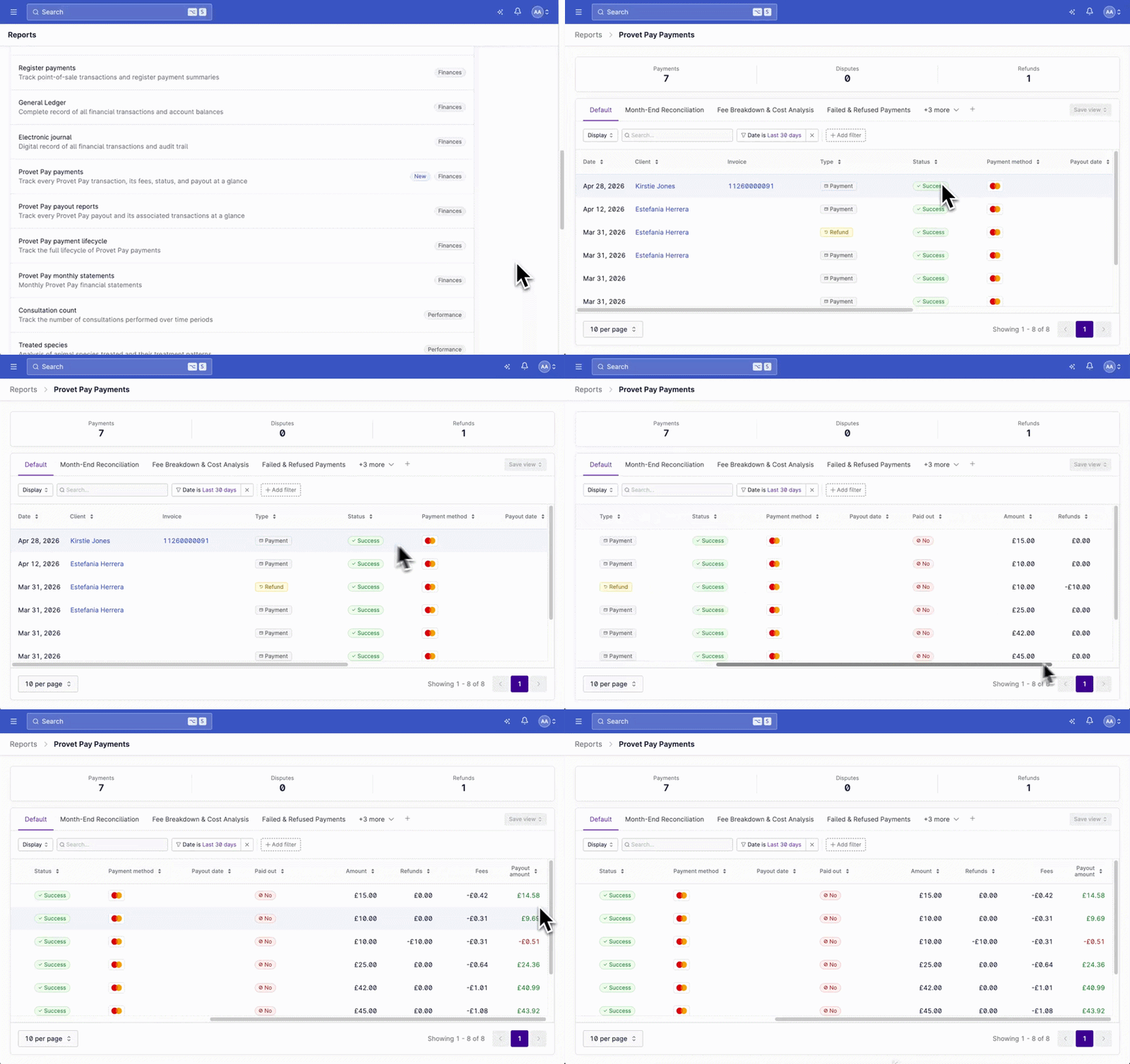
The new Provet Pay Payments Report shows an itemized fee breakdown (interchange + processing) at the transaction level, with filters by payment method, location, status, and type — plus relative date filters like "last 30 days." Multi-clinic? You'll see all your locations in one view.
A fresher Provet
For: Everyone
Provet looks a little sharper this month — updated spacing, layout, and typography across the app. No workflow changes, no settings to flip. More polish coming over the weeks ahead.
.png)
Before / After
.png)
Before / After
.png)
See who makes permission changes
For: Admins
Permission group changes now appear in revision logs, so you can see when access changed and who made it — no more piecing it together after the fact.
Show optional items accurately on estimates
For: Veterinarians · Reception
Items with a minimum sale quantity can now be overridden to 0 on estimates — perfect for showing care that may or may not be needed (e.g., a dental extraction shown as 0–3). The configured minimum still kicks in once the item is added to a consultation.
.png)
Coming Soon
🇬🇧 UK clinics: SQP support for medicine refills
For: UK clinics · Action required by 10 June
From 13 May, you'll be able to designate Suitably Qualified Persons on user profiles, allowing non-vet team members to compliantly refill POM-VPS, NFA-VPS, AVM-GSL, and OTC medicines. You have a one-month window to classify your medicines and tag the right users before full restrictions begin on 10 June. Full guidance lands in the Help Center on 13 May.
Central reminders for multi-clinic groups
For: Multi-clinic / Enterprise
Reminder templates are already centrally managed; reminder rules are catching up. Soon you'll configure once at the central level and roll out to all locations automatically — fewer inconsistencies, less rework.
Simpler handling and injection fee setup
For: Practice Managers · Finance / Admin · Older environments
Handling and injection fees are moving to a cleaner, item-based setup — already live for environments created after 16 March 2026. If yours is older, migration is on the way: configure fees by selecting procedure items directly from your catalog, with predictable fixed pricing and the option to inherit VAT from the linked medicine.
To prepare, review the Migration Guide and contact Provet support when you're ready to enable it.
Smarter defaults for vaccine types
For: Veterinarians · Reception
Picking the right vaccine type during a consultation — primary, booster, or otherwise — is a manual step today, especially when the default doesn't match the patient. Soon, your vaccine procedures and bundles will carry the correct default automatically based on how they're added to the consultation, so the right type applies without you having to think about it.
.png)
Charge the right price for every patient — automatically
For: Veterinarians · Practice Managers · Mixed-species clinics
A medicine dispensed to a cat shouldn't always carry the same markup as the same item used on a large dog. An injection fee that fits a small-animal appointment may not fit a farm visit at all.
Conditional pricing lets you set rules — by species, item type, usage, VAT or location — that apply the right price the moment an item is added to a consultation. New this release: rules can now control injection and handling fees too (exclude them, or swap in a different procedure item).
Heads up: estimates don't yet fully support conditional pricing. If estimates are central to your workflow, we'd suggest waiting until that's live.
Try it: Settings → Lists & Templates → Conditional Pricing.