Provet MCP: Bring Your Practice Data into the AI Tools You Already Use
.jpg)
An AI tool can handle the email, the summary, the spreadsheet in seconds. Ask it about your own practice, though, and it draws a blank. Your appointments, your revenue, and your reporting all live in your practice management system (PIMS), and the AI tool can't see any of it. So you move between the two, copying across what you need by hand.
Now imagine that, if you chose to, your AI tool could read from Provet directly and pull the practice data it needs to answer a question you ask in plain language. That's what Provet MCP (Model Context Protocol) is built to do.
What is Provet MCP?
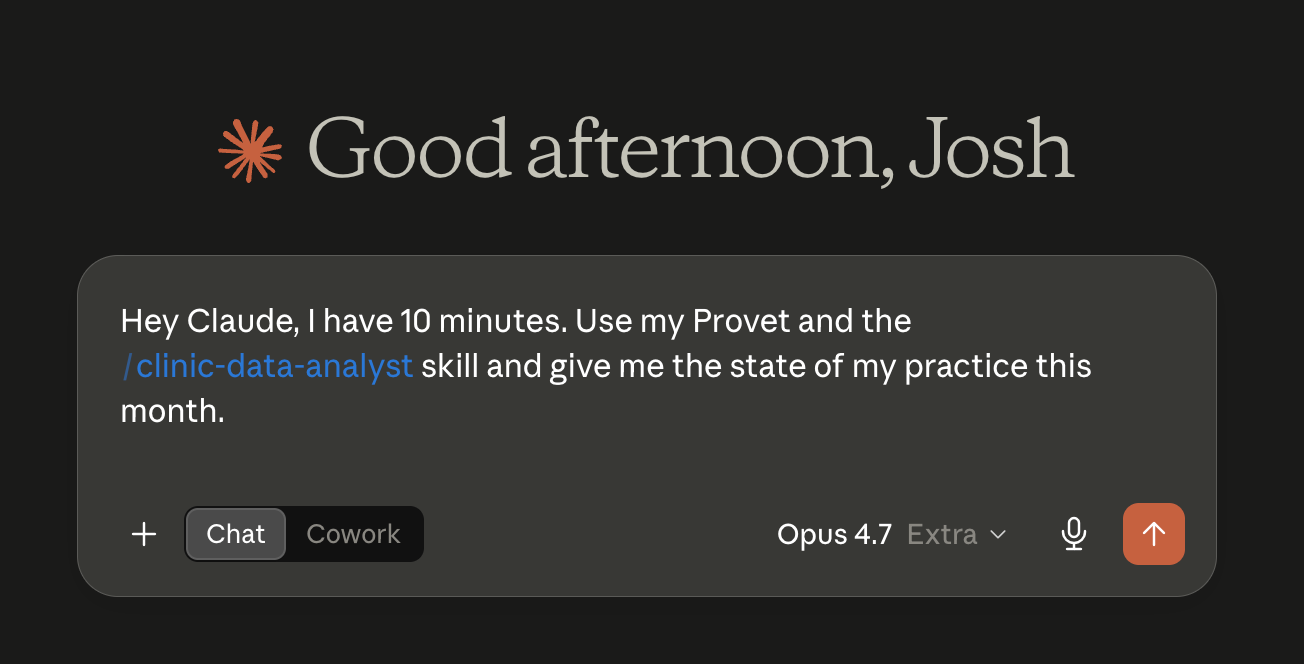
Provet MCP connects your practice to the external AI Agents you already work with, including tools like Claude, ChatGPT, Gemini, and Microsoft Copilot. Once it's connected, those AI Agents can securely read your Provet reporting data and bring it into the conversation, so you can ask questions and run analysis without leaving your AI tool of choice.
MCP stands for Model Context Protocol. In plain English, it's a standard way for an AI tool to talk to another system and use the information in it. A lot of the software you use day to day is starting to offer one. Your accounting software might have an MCP. So might your payroll tool. Provet is the first and only veterinary PIMS to offer a public MCP, so the AI tool you already use can read your Provet data too.
Who is Provet MCP for?
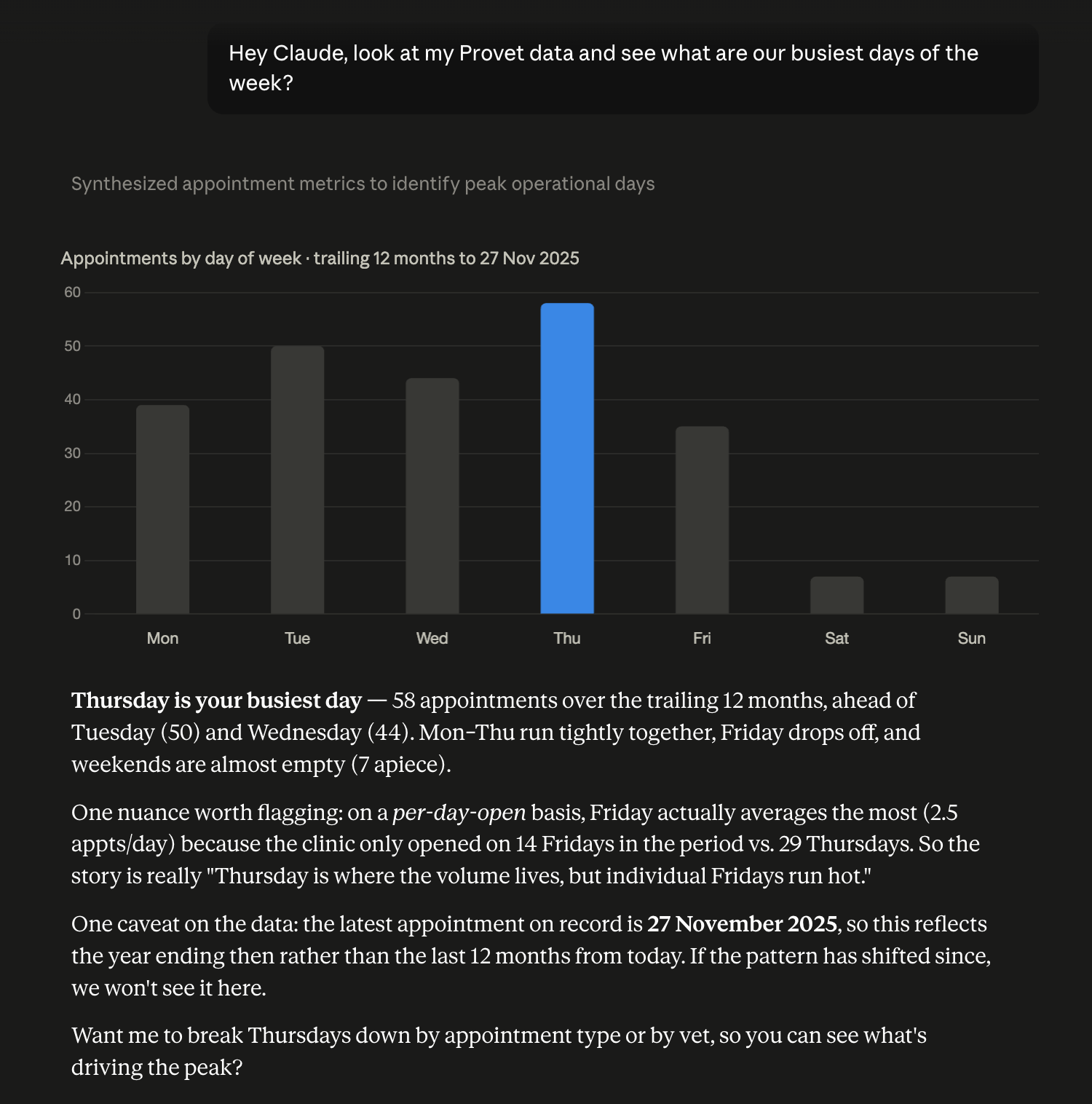
Provet MCP suits anyone who already works in an AI tool and wants their Provet data there too, often managers, operators, and IT or operational leads connecting Provet to the rest of the stack. It does ask a little setup: an AI subscription, and connecting the tool.
If you'd rather not set anything up, Ask Provet answers questions about your practice right inside Provet. Many people use both, depending on the task in front of them.
How can Provet MCP help day-to-day?
The value shows up when you connect Provet alongside your other tools. Say you want to know how much revenue is attributed to each of your veterinarians. Their revenue lives in Provet. Their salary costs live in your accounting software, whether that's Xero, QuickBooks, or Zoho Books. Connect both to your AI tool and you can ask something like: take my top five veterinarians by sustained monthly revenue, cross-reference their salary cost, and show me the profitability of each.
Your AI tool reads the revenue figures from Provet, pulls the cost figures from your accounting software, and returns the comparison with the analysis behind it. That's the kind of question that normally needs a data warehouse, someone who knows SQL, or a long stretch in a spreadsheet. Provet MCP is designed to make it something you can ask in a sentence.
This fits a wider principle. Provet is an open platform: 150+ integrations, a documented open API, and 100% ownership of your data. Provet MCP is another way to put that openness to work, without the custom build that using the API directly would take. It joins AI Actions and Ask Provet in Provet's growing set of AI Agents for veterinary teams.
Clinic reporting without logging in
If you're a practice manager or clinic owner, a lot of your week runs through Provet's Reporting section. Month-end income, aging debt, appointment mix, health plan utilization. Those are the numbers you answer to your directors with, and the ones that tell you where the practice actually stands. It works. But every question means opening the right report, setting the date range, filtering, exporting, and sometimes joining two reports in a spreadsheet before you have your answer.
With Provet MCP connected, you can ask your AI tool the same questions in plain English and get an answer back with the analysis already done. Prompts like:
- "How did we do last month?"
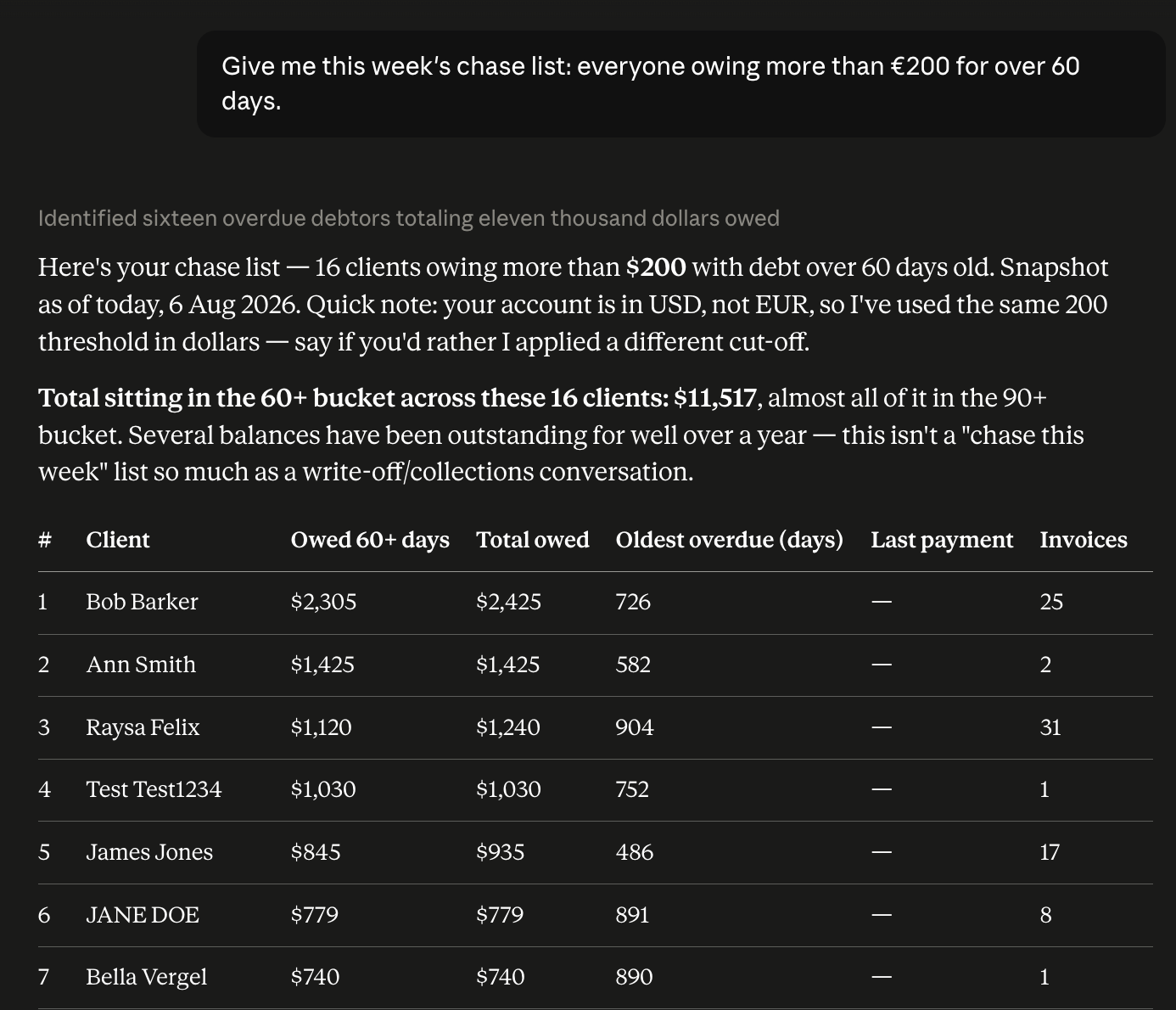
- "Give me this week's chase list: everyone owing more than €200 for over 60 days."
- "Which patients haven't been seen in over a year?"
In the background, Provet MCP is exposing the data areas your AI tool needs to answer: invoicing, debtors, payments, appointments, clients and patients, health plans, clinical activity, and catalog. Provet MCP supplies the data; your AI tool does the analysis and hands you the answer in the shape you asked for, with room for the follow-up question straight after.
Example: The weekly chase list
Practice manager, Monday morning. Ask: "Give me a chase list: everyone owing more than €200 for over 60 days." Provet MCP surfaces the debtor data. Your AI tool ranks who owes the most, how old the debt is, splits insurance versus client, and shows the average days to payment. You get a working list, not a report you still have to interpret.
Example: The Monday-morning check-in
Clinic owner, first Monday of the month. Ask: "Run my practice health check for last month." You get income compared with last month and the same month last year, invoice count, your top five services, and consultation count. The kind of snapshot that used to mean opening three reports and reconciling them in Excel, delivered in one prompt.
Five skills to get started
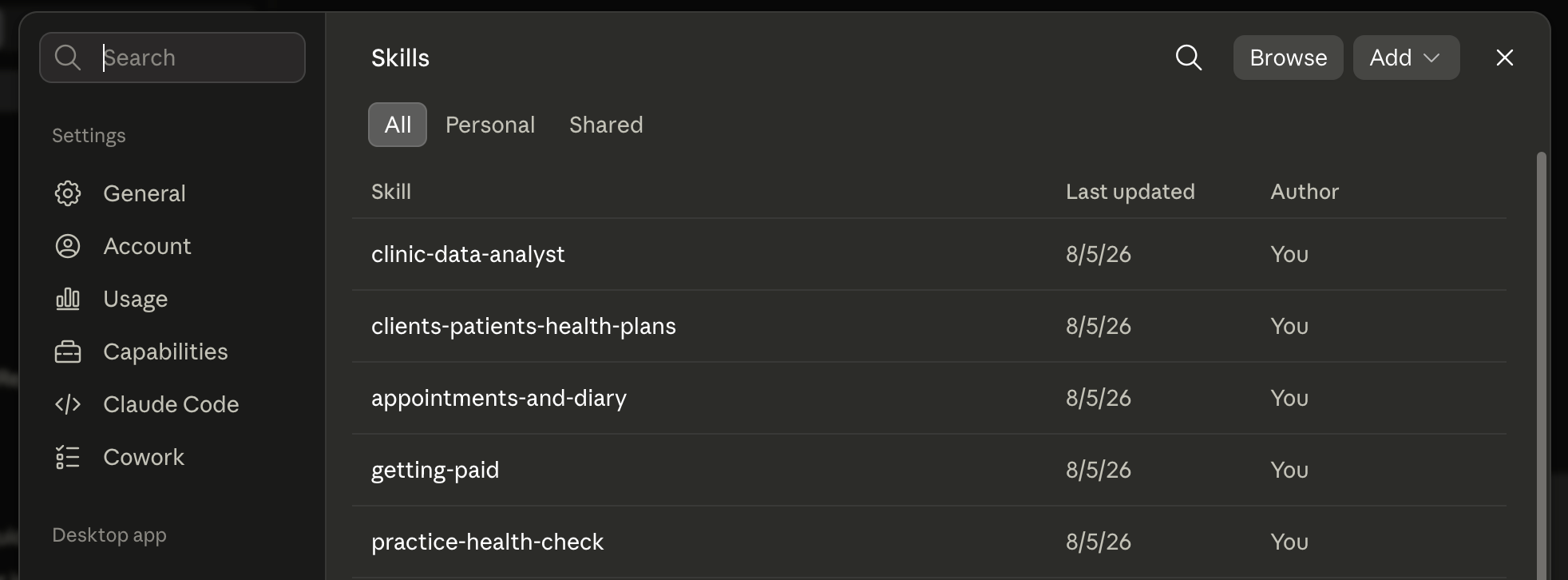
Find out how to load a skill into your AI tool in our help article.
How does Provet MCP handle permissions and security?
Permissions work in two layers.
- Provet MCP uses your existing Provet permissions. Your AI tool only sees what your Provet account can already see. It doesn't get a wider view of your practice than you have.
- Your AI tool's own approval flow controls each action. You can approve a request once, always allow it, or block it.
On top of that, Provet MCP is read-only. It reads your data for analysis. It can't write anything back to your Provet workspace.
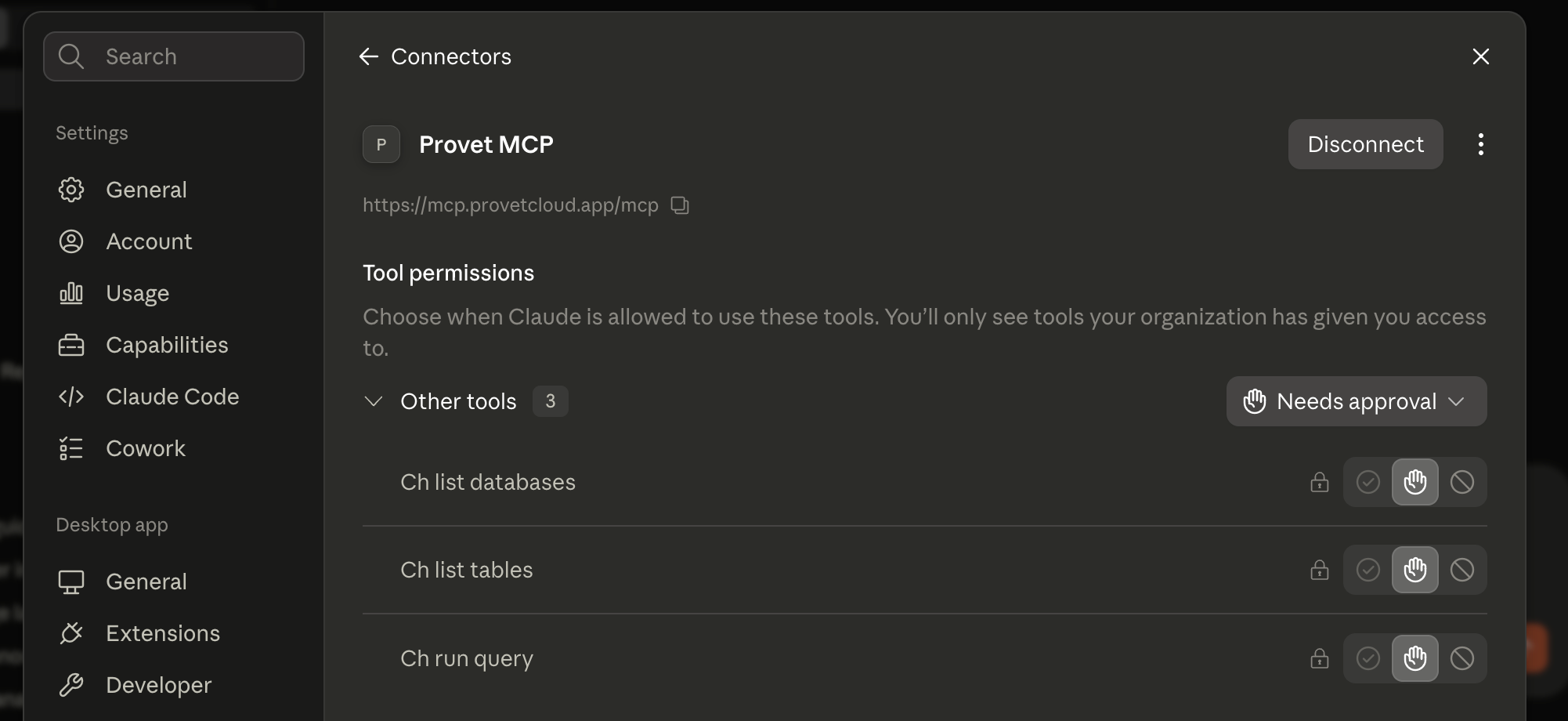
What about your data and privacy?
Because Provet MCP works within your existing Provet permissions, access is scoped to your account. There's one thing worth understanding about how the data flows: when you connect Provet MCP to your own AI tool, the data you pull is processed by that AI provider, under your own account and their terms. How it's stored, retained, or used is governed by that provider's settings, not by Provet, so it's worth checking your AI provider's data controls.
AI Agents like this are assistive. They read and organize your data so you can ask better questions and get to an answer faster. The judgment about what to do with the answer stays with you and your team.
What does Provet MCP cost, and when can you get it?
Access to Provet MCP is included in your Provet subscription on the Pro and Enterprise plans. Provet doesn't charge for MCP access itself. If you connect it to your Claude, ChatGPT, or other AI account, the tokens you use are billed by that AI provider under your own subscription.
Once your clinic has Provet MCP enabled and you have the right permissions, connecting takes about two minutes. Check out this help center article which walks you through connecting it step by step.
Connect Provet MCP and the tool that drew a blank about your practice can finally answer. No exporting, no copying across by hand. Just the data you needed, in the tool you already use.
Frequently Asked Questions
Related articles

Multi-Location Vet Practice Software: Features, Costs, and How to Choose
October 2, 2026

Veterinary Medical Records Software: What is Veterinary EMR?
October 2, 2026

The CMA Vet Investigation: Thoughts From UK and US Veterinarians
September 3, 2026