Provet Release - September 2026: First veterinary PIMS with a public MCP server, plus a smarter Ask Provet
This month's update opens Provet to your AI tool of choice. Provet MCP is the first public MCP server from a veterinary PIMS, giving Claude, ChatGPT, Gemini, or Microsoft Copilot read-only access to your Provet data. And Ask Provet now answers on clients and patients, consultations and clinical detail, and the calendar. Not just financials.
You'll also find a new Consultation Report that puts wait times, duration, and revenue in one view, Trigger Topics that let you speak up before a client finishes an online booking, and the Provet Pay Payout Report now available to all Pay clinics. Plus finer Ask Provet permissions and full-dataset exports, wholesalers connecting themselves to Provet, clients confirming their own online bookings, and Provet Academy moving inside your workspace.
New
Give your AI tool a direct line to your Provet data
For: Pro and Enterprise plan clinics with a paid AI tool subscription
Provet MCP securely connects your Provet data to ChatGPT, Claude, Gemini, and other AI tools, so you can chat back and forth about how your clinic is doing. Ask "How did we do last month?" in plain English and keep asking until you find the answer you need.
Once you're connected, you can:
- Ask clinic reporting questions in plain English and get answers pulled from your live data
- Cross-reference with data from your other systems, like revenue in Provet against costs in your accounting tool
- Surface patterns without exporting reports and stitching them together in Excel
- Build AI agents that run standing jobs on your live Provet data, like a monthly business review
To help you hit the ground running, we've put together a Provet MCP Skills Library with five ready-to-use skills organized by use case. Save them to your AI tool and go.
Read-only by design, so nothing can be written back to your records. Access is governed by your existing Provet permissions. Included on Pro and Enterprise plans at no additional cost.
Help: Overview of Provet MCP
Ask Provet answers on clients, patients, and the calendar too
For: Practice managers, clinic owners, and finance admins with reporting access
Ask Provet used to answer only financial questions. It now covers clients and patients, consultations and clinical detail, and the calendar.
That means you can ask for lists you used to build by hand. "List all my dogs." "Show me every patient diagnosed with osteoarthritis or otitis externa this year." "Which new patients never came back?" "Show me Bella's clinical history." All answered in seconds, without exporting and filtering.
The calendar opens up too: waiting times, consultation durations, cancellation rate, new versus returning, busiest column on the calendar.
These were the two areas you asked for most at the July launch webinar, and pulling patient lists was the standout ask on the patient side. Find it in Reporting → Ask Provet.
Help: Overview of Ask Provet
See where consultation time goes and what it earns
For: Practice managers and clinic owners with reporting access
The new Consultation Report replaces the old Consultation Count list with a proper performance view. Volume, timing, and revenue sit in one place: consultation count, consultations per veterinarian, and first-time vs repeat client mix. Wait time (admitted to started) and duration (started to finished). Average revenue per consultation, broken down by veterinarian and by complaint type.
Group and filter by department, veterinarian, patient type, complaint or reason, status, and client type. Save views, export, schedule, and share it like any other report.
Find it under Reports → Consultations. Requires the Consultation report permission.
Catch the bookings that shouldn't be self-booked
For: Clinics using the new online booking portal
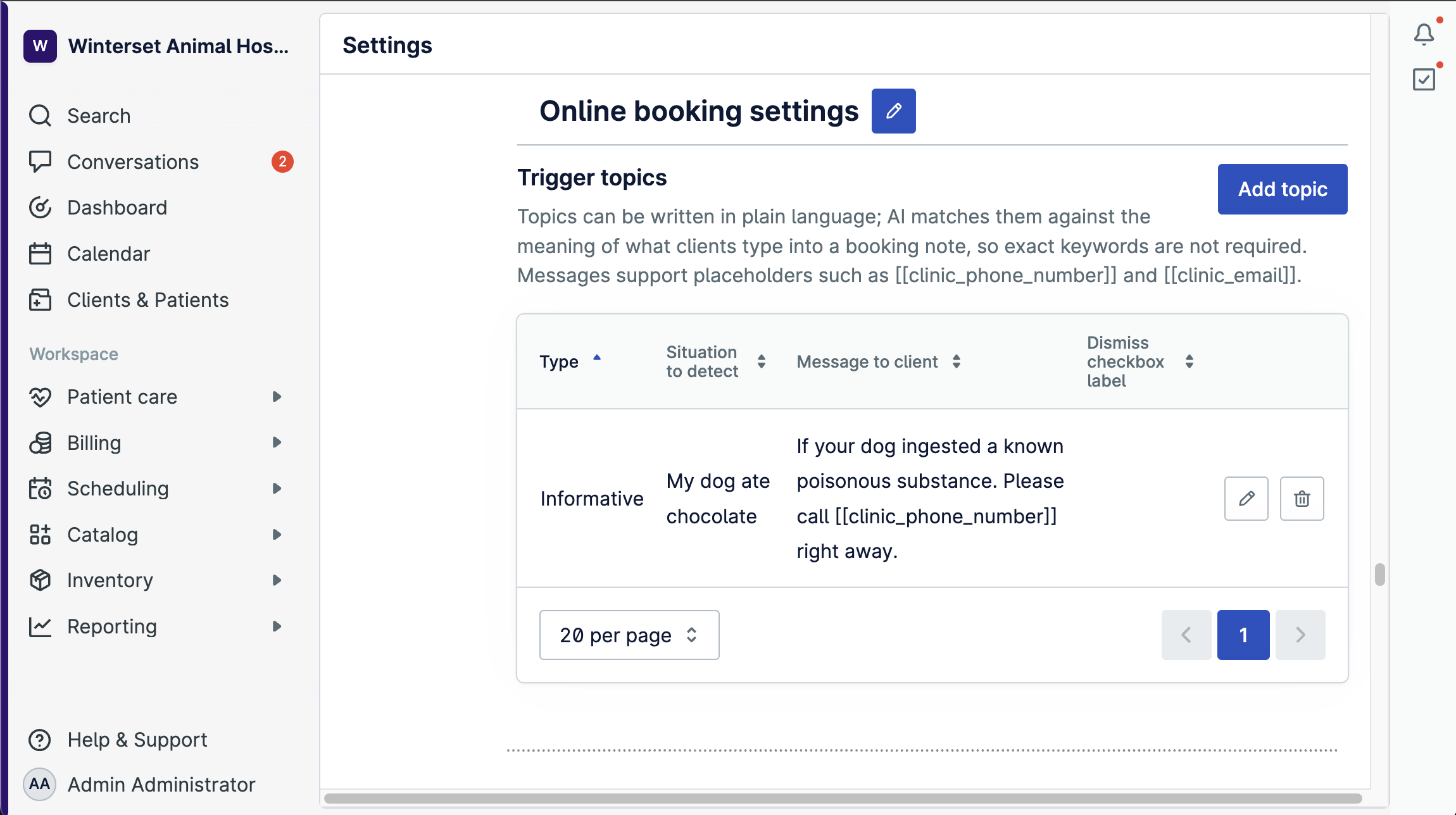
Trigger Topics let you describe a situation in plain language, like "pet ate something," "aggressive animal," or "fasting required." When a client's booking notes match, they see your message before they finish booking. AI matches by meaning, so you don't maintain keyword lists, and the client can write in a different language than the topic was written in.
Each topic can be preemptive or informative. Preemptive topics show the message and require the client to tick an acknowledgement checkbox before continuing. Useful when the visit belongs on the phone (toxic ingestion, urgent bleeding) but you can't fully block online booking. Informative topics show the message only. Useful for prep instructions like fasting or bringing prior lab results.
Nothing changes until you configure your first topic under Settings → General → Clinic location → Online booking → Trigger topics. Topics never block a booking. They only show a message, and dismissed warnings show up on the appointment for staff to review.
Help: Set Up Trigger Topics for Online Booking
Reconcile Provet Pay payouts in one report
For: Clinics using Provet Pay
The new Payout Report shows what actually landed in your bank against what you invoiced. A summary view, a payout list view, and a payout detail view all sit in the same report. Filter, group, and sort like any standard Provet report.
Now available to all Provet Pay clinics.
Improvements
Give Ask Provet to the people who need it, and export the whole dataset
For: Clinic admins and anyone your clinic gives Ask Provet access to
Two updates make Ask Provet work beyond admins.
Permissions. Ask Provet moves into the Reporting permission group and gets nine data-area permissions beneath it: Finance, Clients and patients, Consultations and clinical, Scheduling, Stock and inventory, Products and price list, Controlled drugs and regulatory, Health Plans, and Practice and staff. Admins can grant exactly what each permission group may ask about, and Ask Provet answers only within those areas. Everything defaults to off. Nobody gains new access until you deliberately grant it.
Exports. The results table still caps on screen, but the card now shows the true total (for example, "Showing the first 30 of 425 rows"). CSV, Excel, and PDF exports include every row. CSV is effectively unbounded for the largest reports. Excel and PDF have practical limits, and if you hit them, the export tells you and points you to CSV.
Help: Overview of Ask Provet
Your wholesaler can now add themselves to Provet
For: Clinics whose wholesaler isn't yet integrated with Provet
Wholesalers can now connect themselves to Provet. Once they have, they appear in your wholesaler list, keep their product list and prices current for you, and receive your orders instantly.
To add one, go to Inventory → Wholesalers, choose Integration, pick the wholesaler from the list, and enter your customer number.
Until now, every wholesaler connection had to be built by Provet, which meant most smaller and local wholesalers never got one. If yours isn't on the list, ask them to fill in this form to become a partner. Nothing changes for wholesalers you already use through an existing integration.
Let clients confirm or cancel their online bookings
For: Clinics using online booking
Online bookings used to be marked as confirmed at the time of booking, so the "confirmed" flag carried no real signal. The new Appointment Confirmation Workflow adds a link to your online booking confirmation and reminder messages. The client opens a page with their appointment details and can confirm or cancel themselves.
The link is re-checked on every send. Once the client confirms, later reminders don't show it again. The cancel option appears only if you have "Allow client to cancel appointment" turned on.
Opt-in per clinic. Turn on the feature toggle, add the placeholder to your online booking messages, and optionally allow client cancellation.
Help: Appointment confirmation and reminder settings
Learn Provet inside Provet
For: Everyone using Provet
Provet Academy is moving inside Provet. From September 14, product learning lives on a new Academy page in your workspace, and guided tours are available under "Take a Tour."
The current Provet Academy is being sunset. If you've bookmarked that page, it'll no longer work. Access will be from within your Provet workspace now.
Coming mid-to-late September: ask a question through in-app support and you'll be pointed straight to the relevant guide.
Store a third wholesaler code on stock items
For: Clinics ordering the same item from more than two wholesalers
You can now add a tertiary wholesaler and tertiary wholesaler code on stock items (medicines, food, supplies), on top of the existing primary and secondary. The third field only appears once primary and secondary are set, and always shows if a value already exists.
It works wherever the first two codes do: on the item card, in item imports and exports, and in the ordering flow.